Cayo Perico and the FiveM minimap: how the island map actually works
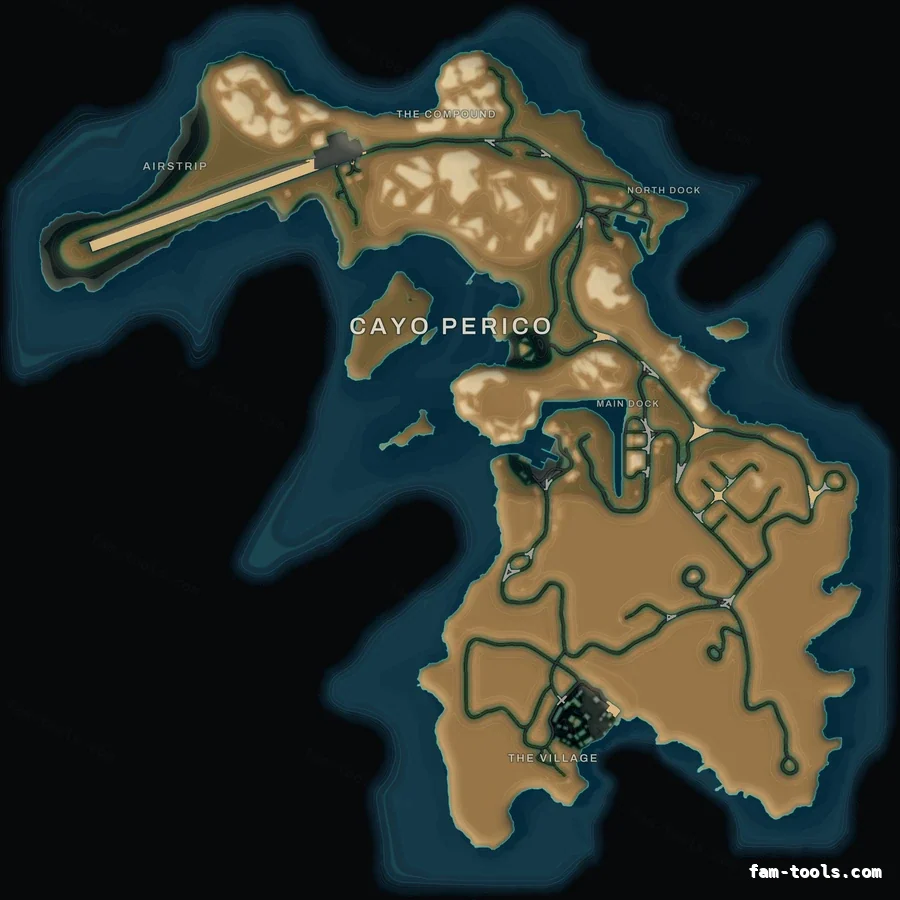
Cayo Perico is a single Scaleform file (int3232302352.gfx) holding three bitmaps, streamed separately from the six Los Santos texture dictionaries. Replacing the mainland minimap never touches it; replacing the island means rewriting that .gfx and streaming it as its own resource.
You install a custom minimap, the mainland looks exactly right, and then a player flies to the island and the radar turns back into stock GTA art mid-flight. Nothing is broken and nothing is misconfigured: Cayo Perico is simply not part of the map you replaced. This explains what the island actually is at the file level, why a normal minimap resource cannot reach it, and what a replacement has to do instead.
#Two different assets, two different systems
The radar you see on the mainland is drawn from texture dictionaries. Six of them carry the land — minimap_0_0 through minimap_2_1, a 2 × 3 grid of 3072-pixel squares, 6144 × 9216 in total — with matching sea tiles behind them and a low-detail sheet for zoomed-out views. A minimap resource streams those files, the client resolves them instead of the stock ones, and that is the entire mechanism.
Cayo Perico uses none of it. The island shipped with the heist update as a Scaleform movie: a single file named int3232302352.gfx, streamed like any other asset, carrying its own artwork as embedded bitmaps. The game switches the radar over to it when the player crosses onto the island and switches back on the way out. Because it is a different file with a different name, a resource that streams minimap_*.ytd has no way to affect it — not through load order, not through priority, not through anything in the manifest.
| Los Santos and Blaine County | Cayo Perico | |
|---|---|---|
| Format | Texture dictionaries (.ytd) | Scaleform movie (.gfx) |
| Files | 6 land + 6 sea + 1 LOD + 65 .ydd geometry | 1 |
| Resolution | 6144 × 9216 across the grid | 1991 × 1995 sea, 1819 × 1773 island |
| Replaced by | Streaming the same .ytd names | Streaming the same .gfx name |
| Switched by | Always active | Arriving on the island / SetToggleMinimapHeistIsland |
What each half of the map actually is
#What is inside the island file
A .gfx is a Scaleform movie, which is an SWF with a Rockstar header on it. Inside int3232302352.gfx there are three image tags, each a zlib-compressed, premultiplied ARGB bitmap.
That structure is why the island can be restyled at all without any modelling work: the artwork is a raster, the same kind of input the mainland tiles are, so the same renderer can consume it.
- One 1991 × 1995 sea bitmap, whose alpha channel encodes the bathymetry as a staircase of shelf bands around the island.
- Two 1819 × 1773 island bitmaps — the same landmass in two states, which is why a restyle has to treat both or the map changes appearance during the heist.
- The island sprite sits at an offset inside the sea sprite rather than centred, so anything drawn across both has to account for it.
#How a matching island map is produced
A colour filter over the stock island is the obvious approach and it is the wrong one: the mainland map is not a filtered image either, so the two never agree. The island has to go through the same renderer.
In practice that means decoding the three bitmaps, separating them into the same channels the mainland map is built from — land mask, relief, shading, road hierarchy, coastline, bathymetry, labels — and then colouring those channels with the identical palette. The output matches the mainland by construction rather than by eye, because the same code produced both.
- The land mask and the coast glow come from the island sprite alpha, so the rim reads exactly like the mainland coastline.
- Water depth comes from the sea sprite alpha, which is what the mainland source encodes too, so the shelf gradient and the contour rings match.
- The airstrip is the only feature wide enough to qualify as a trunk route, so it carries the palette accent the way a freeway does on land; the concrete apron beside it is treated as pavement, not road.
- The stock island carries no lettering at all, so district names are set in the same grotesque, letter-spaced and haloed, as the zone names baked into the mainland art.
#Installing an island map
It installs exactly like a minimap, because it is one. One folder, one ensure line, no script and no dependency. The island resource and the mainland resource never touch the same file names, so load order is irrelevant and the two cannot conflict.
- 01 Copy the folder
Unzip the island resource into your resources directory, next to the mainland map.
- 02 Ensure it
Add one line to server.cfg. It can go anywhere; there is no ordering requirement.
ensure pityus_minimap_cayo_orange - 03 Clear the client cache
Streamed assets are cached per server. Delete FiveM.app/data/server-cache and server-cache-priv, then reconnect.
- 04 Check on the island, not on the mainland
The island map only draws while the island radar is active, so the mainland looks unchanged either way. Fly out and look.
resources/
└─ [standalone]/
   ├─ pityus_minimap_orange/
   └─ pityus_minimap_cayo_orange/

server.cfg:  ensure pityus_minimap_orange
ensure pityus_minimap_cayo_orange#Making the island exist, not just look right
Replacing the artwork and switching the island on are two separate jobs. FiveM does not load Cayo Perico for you: the island IPLs have to be requested on the client, the radar has to be told to draw the island interior, and the world content, scenario peds, ambient zones and water have to be swapped across as the player arrives — or the sea behaves like open ocean and the island is an empty lump of terrain.
The radar part is the one that matters for the map itself. The island is drawn as an interior called h4_fake_islandx, so a client that never calls SetRadarAsInteriorThisFrame for it will never show the island artwork at all, no matter which .gfx is streamed. That is the mechanism, and it is why an island map without a script is only half a product.
The island resource sold here carries that script next to the texture, as a single script.lua. It is the proven island loader: nothing to configure, it runs as soon as the resource starts. If your server already loads Cayo Perico from another resource, remove the client_script line from fxmanifest.lua and the folder goes back to being pure artwork.
| Part | When | What it does |
|---|---|---|
| RequestIpl × 319 | Resource start | Requests every island IPL that builds the world (the gate stays closed) |
| SetRadarAsInteriorThisFrame | Every frame | Draws the h4_fake_islandx radar interior — this is what shows the map |
| HeistIsland + path nodes | Within 2 km | Island hopper and island path nodes on, off again as you leave |
| Heist_Island_Peds | Within 2 km | The island scenario peds |
| AZL_DLC_Hei4_Island_Zones | Within 2 km | Island ambient zones on, the disabled-zone list off |
| SetDeepOceanScaler(0.0) | Resource start | Calm water around the island instead of open ocean |
What script.lua does
#When the island still looks wrong
The last row is the only real conflict case, and it behaves exactly like two mainland minimaps fighting over minimap_0_0.ytd: whichever the server resolves last wins, and that order is not stable between restarts. Keep one island map installed.
| What you see | Why | Fix |
|---|---|---|
| Mainland changed, island did not | No island resource is running | The island is a separate file — install the island resource too |
| Island map is empty sea, the island itself is missing | script.lua is not running — the client_script line is missing from fxmanifest.lua | Make sure fxmanifest.lua ends with client_script 'script.lua', then restart the resource and reconnect |
| Island is the old art after installing | Client cache | Delete server-cache and server-cache-priv, reconnect |
| Island art flips between two looks | Only one of the two island bitmaps was restyled | Use a build that rewrites both |
| Island never appears on the radar | The island radar was never enabled | SetToggleMinimapHeistIsland(true) while the island is active |
| Island is there but the water looks wrong | Alternate water map not loaded | LoadGlobalWaterType(1) on the island, 0 on the mainland |
| Two island maps fighting | Another resource streams the same .gfx | Only one resource may provide int3232302352.gfx |
Symptom, cause, fix
#Does it cost anything at runtime?
No. A replacement file has the same dimensions and the same pixel format as the original, so the island asks the engine for exactly as much memory as it did before. There is no script, no thread and no per-frame work: it is art streamed to the client and drawn underneath the HUD, the same as the mainland map.
The only number that changes is the size on disk, because colour compresses worse than the stock greyscale artwork. That affects the first download and nothing else.
#Do you actually need one?
Only if your players go there. If nothing on your server sends anybody to the island, the mainland map is complete on its own and the island is dead weight.
If you run the heist, an island job, a smuggling or cartel storyline, or a Cayo-based custom map, then players cross that boundary several times a session — and the radar changing style in mid-air is the kind of detail that reads as an unfinished server. That is the entire case for it.
Questions
Why does my custom minimap not change Cayo Perico?
What file is the Cayo Perico minimap?
Can the island map break my mainland minimap?
Does the island map need a script?
Why does the island look like the old art after I installed it?
How much does a Cayo Perico minimap cost?
Ready to pick a map?
Twelve themes on three base map styles, $8 each, instant download.
Relevant to what you just read
Look it up while you work
The reference tables this guide leans on, free and without an account.
- The map modding glossary38 terms — file formats, radar parts, framework words — each with a one-line answer first.